
70Chapter 70 of 74
Launch Noisy Controller
Introduction
The noisy controller of chapter 69 works out odometry with wheel sizes that carry a small mistake, so that it can be compared with the exact odometry of the simple controller. It is ready as a node, but nothing starts it yet. It should start every time the control system of the robot starts, so it goes into controller.launch.py, the launch file of the controllers.
It should start whichever wheel controller is used: the simple controller or the differential drive controller. And its two mistakes should be easy to change, so the launch file gets two new launch arguments:
wheel_radius_error, the mistake added to the wheel radius (default 0.005 m, that is 5 mm),wheel_separation_error, the mistake added to the distance between the wheels (default 0.02 m, that is 20 mm).
The values must be added to the exact sizes before the node starts. Launch arguments are only text, and placeholders cannot be added together, so the sums are made in a small Python function that the launch service runs while it is launching, wrapped in an OpaqueFunction.
The node noisy_controller.py from chapter 69 must already exist and be installed, and the controller launch file of chapter 45 must already work. This chapter only changes controller.launch.py.
Where the pieces come from
| Idea | Where it was met | Section |
| the noisy node and its parameters wheel_radius and wheel_separation | chapter 69 | the code of noisy_controller.py |
| this launch file, launch arguments and placeholders, GroupAction and conditions | chapter 45 | Update the controller launch file and Inspect the available launch arguments |
| starting a Python node from a launch file | chapter 43 | Launch the Python controller |
| how the wheel sizes enter the odometry | chapter 64 | The formulas |
| why wrong sizes spoil the odometry | chapter 60 | When odometry goes wrong |
Writing the code
Open the file
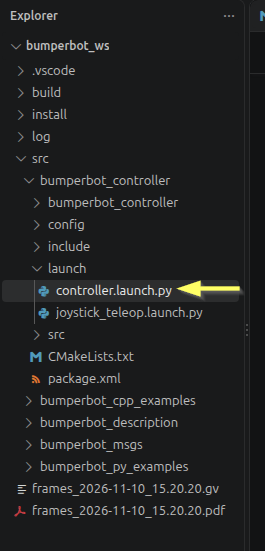
In VS Code, open src, the bumperbot_controller package folder, then the launch folder inside it, and open controller.launch.py.
The code
The whole file, with the new lines added to the launch file of chapter 45:
from launch import LaunchDescription
from launch.actions import DeclareLaunchArgument, GroupAction, OpaqueFunction
from launch_ros.actions import Node
from launch.substitutions import LaunchConfiguration
from launch.conditions import UnlessCondition, IfCondition

def noisy_controller(context, *args, **kwargs):
    use_sim_time = LaunchConfiguration("use_sim_time")
    wheel_radius = float(LaunchConfiguration("wheel_radius").perform(context))
    wheel_separation = float(LaunchConfiguration("wheel_separation").perform(context))
    wheel_radius_error = float(LaunchConfiguration("wheel_radius_error").perform(context))
    wheel_separation_error = float(LaunchConfiguration("wheel_separation_error").perform(context))

    noisy_controller_py = Node(
        package="bumperbot_controller",
        executable="noisy_controller.py",
        parameters=[
            {
                "wheel_radius": wheel_radius + wheel_radius_error,
                "wheel_separation": wheel_separation + wheel_separation_error,
                "use_sim_time": use_sim_time,
            }
        ]
    )

    return [noisy_controller_py]


def generate_launch_description():

    use_sim_time_arg = DeclareLaunchArgument(
        "use_sim_time",
        default_value="True",
    )
    use_simple_controller_arg = DeclareLaunchArgument(
        "use_simple_controller",
        default_value="True",
    )
    wheel_radius_arg = DeclareLaunchArgument(
        "wheel_radius",
        default_value="0.033",
    )
    wheel_separation_arg = DeclareLaunchArgument(
        "wheel_separation",
        default_value="0.17",
    )
    wheel_radius_error_arg = DeclareLaunchArgument(
        "wheel_radius_error",
        default_value="0.005",
    )
    wheel_separation_error_arg = DeclareLaunchArgument(
        "wheel_separation_error",
        default_value="0.02",
    )
    use_sim_time = LaunchConfiguration("use_sim_time")
    use_simple_controller = LaunchConfiguration("use_simple_controller")
    wheel_radius = LaunchConfiguration("wheel_radius")
    wheel_separation = LaunchConfiguration("wheel_separation")

    joint_state_broadcaster_spawner = Node(
        package="controller_manager",
        executable="spawner",
        arguments=[
            "joint_state_broadcaster",
            "--controller-manager",
            "/controller_manager",
        ],
    )

    wheel_controller_spawner = Node(
        package="controller_manager",
        executable="spawner",
        arguments=[
            "bumperbot_controller",
            "--controller-manager",
            "/controller_manager",
        ],
        condition=UnlessCondition(use_simple_controller),
    )

    simple_controller = GroupAction(
        condition=IfCondition(use_simple_controller),
        actions=[
            Node(
                package="controller_manager",
                executable="spawner",
                arguments=[
                    "simple_velocity_controller",
                    "--controller-manager",
                    "/controller_manager",
                ],
            ),
            Node(
                package="bumperbot_controller",
                executable="simple_controller.py",
                parameters=[
                    {
                        "wheel_radius": wheel_radius,
                        "wheel_separation": wheel_separation,
                        "use_sim_time": use_sim_time,
                    }
                ],
            ),
        ],
    )
    noisy_controller_launch = OpaqueFunction(function=noisy_controller)

    return LaunchDescription(
        [
            use_sim_time_arg,
            use_simple_controller_arg,
            wheel_radius_arg,
            wheel_separation_arg,
            wheel_radius_error_arg,
            wheel_separation_error_arg,
            joint_state_broadcaster_spawner,
            wheel_controller_spawner,
            simple_controller,
            noisy_controller_launch
        ]
    )
What is new
- Line 3:
OpaqueFunctionis added to the imports fromlaunch.actions. - Lines 8 to 27: the function
noisy_controller(context, ...). It reads the four sizes and errors as numbers (lines 10 to 13), describes the noisyNodewith the sizes plus their errors (lines 15 to 25) and returns it in a list (line 27). - Lines 48 to 55: the two new launch arguments,
wheel_radius_errorandwheel_separation_error, with the defaults "0.005" and "0.02". - Line 107:
noisy_controller_launch = OpaqueFunction(function=noisy_controller)wraps the function in an action. - Lines 115, 116 and 120: the two new arguments and the new action are added to the
LaunchDescriptionlist. Line 120 has no condition, so the noisy controller starts with both wheel controllers.
Everything else is the launch file of chapter 45, unchanged.
From text to numbers
A launch argument is a text. LaunchConfiguration("wheel_radius") is only a placeholder for it. To add the error to the size, the placeholder has to become a number in three small steps (lines 10 to 13):
LaunchConfiguration("wheel_radius"): the placeholder,.perform(context): ask the launch context for its real value, the text"0.033",float(...): turn the text into the number 0.033.
Then lines 20 and 21 add the errors:
- wheel radius: 0.033 + 0.005 = 0.038 m,
- wheel separation: 0.17 + 0.02 = 0.19 m.
The simple controller (lines 94 to 104) still gets the exact 0.033 and 0.17. That is the point: one odometry is exact, the other is worked out with sizes that are a little wrong. The radius is wrong by 0.005 ÷ 0.033 = 15%, and the separation by 0.02 ÷ 0.17 = 12%. Drag the two errors to see what this does to a drive and a turn:
Code visualizer
Every line explained, with a step-by-step launch, a map, bugs to try and a live picture of the arguments turning into numbers and processes. Lines that did not change since chapter 45 keep their explanation; the new lines 3, 8 to 27, 48 to 55, 107 and 115 to 120 are the new part.
Building and running
Build
Open a terminal and build the workspace:
cd bumperbot_wscolcon build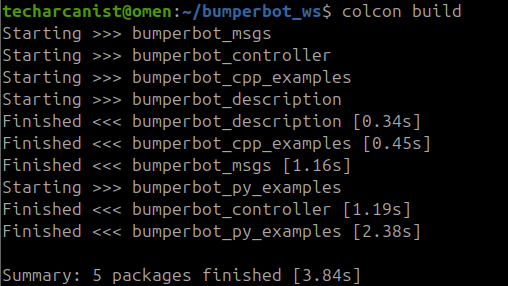
What you should see
Starting >>> bumperbot_msgs
Starting >>> bumperbot_controller
Starting >>> bumperbot_cpp_examples
Starting >>> bumperbot_description
Finished <<< bumperbot_description [0.34s]
Finished <<< bumperbot_cpp_examples [0.45s]
Finished <<< bumperbot_msgs [1.16s]
Starting >>> bumperbot_py_examples
Finished <<< bumperbot_controller [1.19s]
Finished <<< bumperbot_py_examples [2.38s]

Summary: 5 packages finished [3.84s]
Remember
- The noisy controller is started from
controller.launch.py, so it starts with the control system of the robot, whichever wheel controller is used: its action on line 120 has no condition. - Two new launch arguments,
wheel_radius_error(0.005) andwheel_separation_error(0.02), are declared (lines 48 to 55) and listed in theLaunchDescription(lines 115 and 116). Both are metres, written as text. - A launch argument is text and
LaunchConfigurationis a placeholder. To add numbers, use.perform(context)to get the text andfloat(...)to get the number. - An
OpaqueFunctionruns a Python function while the launch is running, with the launch context. The function returns a list of actions, here the noisy Node. - The noisy node gets the radius 0.033 + 0.005 = 0.038 m and the separation 0.17 + 0.02 = 0.19 m. The simple controller keeps the exact 0.033 and 0.17.
- The new action has to be in the
LaunchDescriptionlist, otherwise the noisy node never starts and nothing complains.