
69Chapter 69 of 74
Adding Noise to Robot Motion: the Noisy Controller
Introduction
In chapters 62 to 66 the node simple_controller learned to work out where the robot is. It reads the wheel angles on joint_states, adds up one small step per reading into x_, y_ and theta_, publishes the pose as an Odometry message and sends it as the transform from odom to base_footprint. In the Gazebo simulation the wheel angles are perfect, so this odometry is perfect too, apart from rounding. A real robot is not so lucky: its encoders are never exactly right.
This chapter makes the simulation less perfect on purpose. A second node, noisy_controller, copies the odometry of the simple controller and adds a small random error, Gaussian noise, to each wheel angle before it uses it. Its odometry is then slightly wrong in the way a real sensor makes it wrong, and the errors add up, so the estimated pose slowly wanders away from the true one. That gives something to correct later, when the robot has to work out where it really is.
The noisy node must be able to run next to the simple controller, so that their poses can be compared. For that it uses another node name, another topic and another child frame. Nothing is started in this chapter: the node is written and built here, and the next chapter, Launch Noisy Controller, starts it with the simple controller.
The simple controller from chapters 62 to 66 must already build and run, with the Gazebo simulation. This chapter adds a new file, noisy_controller.py, and one line in CMakeLists.txt. It needs no new dependency: the packages it uses were added in chapters 65 and 66.
Where the pieces come from
| Idea | Where it was met | Section |
| dp, dt and the wheel speeds from joint_states | chapters 61 and 62 | Change, written Δ, and the wheel speed and The code |
| d_s, d_theta and the pose x, y, theta | chapter 64 | What is new and The formulas |
| the Odometry message and the quaternion | chapter 65 | The code |
| the transform odom to base_footprint | chapter 66 | What is new and The same numbers, twice |
| why odometry drifts | chapter 60 | When odometry goes wrong |
| why a robot is never completely sure, and how a small error becomes a wrong position | chapter 67 | Why a robot is never completely sure and A small wrong size becomes a wrong position |
| local and global localization | chapter 58 | Three reference frames |
What Gaussian noise means
A Gaussian (or normal) random number comes from the bell curve. Two numbers describe the curve:
- the mean: the middle of the curve. Here it is 0, so the errors are as often positive as negative and do not lean to one side.
- the standard deviation: how wide the curve is, a typical size of the error. Here it is 0.005 rad, which is 0.29 degrees of wheel angle.
About 68 out of 100 draws fall within one standard deviation of the mean (between -0.005 and +0.005 rad), about 95 within two (between -0.010 and +0.010) and about 99.7 within three. In numpy the draw is np.random.normal(0, 0.005): mean first, standard deviation second.
Writing the code
Create the file
In VS Code, open src, then the bumperbot_controller package folder, then the bumperbot_controller folder inside it. Next to simple_controller.py, create a new file called noisy_controller.py.
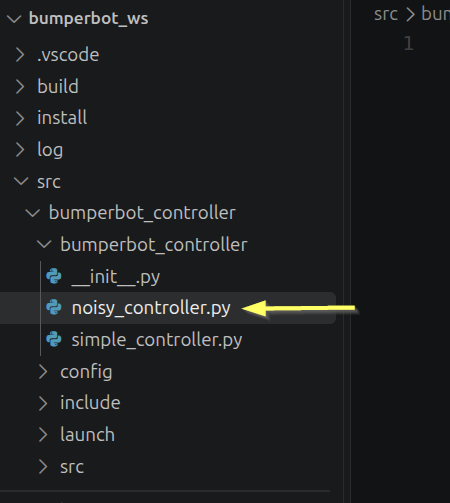
The easy way to start is to copy the whole content of simple_controller.py into it, rename the class from SimpleController to NoisyController (every instance, also in main), and then cut away what this node does not need.
The code
The whole file, after the changes below:
#!/usr/bin/env python3
import rclpy
from rclpy.node import Node
from rclpy.time import Time
from rclpy.constants import S_TO_NS
from sensor_msgs.msg import JointState
from nav_msgs.msg import Odometry
import numpy as np
from tf2_ros import TransformBroadcaster
from geometry_msgs.msg import TransformStamped
import math
from tf_transformations import quaternion_from_euler

class NoisyController(Node):

    def __init__(self):
        super().__init__("noisy_controller")
        self.declare_parameter("wheel_radius", 0.033)
        self.declare_parameter("wheel_separation", 0.17)

        self.wheel_radius_ = self.get_parameter("wheel_radius").get_parameter_value().double_value
        self.wheel_separation_ = self.get_parameter("wheel_separation").get_parameter_value().double_value

        self.get_logger().info("Using wheel radius %f" % self.wheel_radius_)
        self.get_logger().info("Using wheel separation %f" % self.wheel_separation_)

        self.left_wheel_prev_pos_ = 0.0
        self.right_wheel_prev_pos_ = 0.0
        self.x_ = 0.0
        self.y_ = 0.0
        self.theta_ = 0.0

        self.joint_sub_ = self.create_subscription(JointState,"joint_states", self.jointCallback, 10)
        self.odom_pub_ = self.create_publisher(Odometry, "bumperbot_controller/odom_noisy", 10)

        self.speed_conversion_ = np.array([[self.wheel_radius_/2, self.wheel_radius_/2],
                                           [self.wheel_radius_/self.wheel_separation_, -self.wheel_radius_/self.wheel_separation_]])
        self.get_logger().info("The conversion matrix is %s" % self.speed_conversion_)

        self.odom_msg_ = Odometry()
        self.odom_msg_.header.frame_id = "odom"
        self.odom_msg_.child_frame_id = "base_footprint_ekf"
        self.odom_msg_.pose.pose.orientation.x = 0.0
        self.odom_msg_.pose.pose.orientation.y = 0.0
        self.odom_msg_.pose.pose.orientation.z = 0.0
        self.odom_msg_.pose.pose.orientation.w = 1.0

        self.br_ = TransformBroadcaster(self)
        self.transform_stamped_ = TransformStamped()
        self.transform_stamped_.header.frame_id = "odom"
        self.transform_stamped_.child_frame_id = "base_footprint_noisy"

        self.prev_time_ = None

    def jointCallback(self, msg):
        now = Time.from_msg(msg.header.stamp)

        if self.prev_time_ is None or now < self.prev_time_:
            self.left_wheel_prev_pos_ = msg.position[0]
            self.right_wheel_prev_pos_ = msg.position[1]
            self.prev_time_ = now
            return

        dt = (now - self.prev_time_).nanoseconds / S_TO_NS
        if dt == 0.0:
            self.get_logger().warn("Skipping joint state: duplicate stamp",
                                   throttle_duration_sec=2.0)
            return

        wheel_encoder_left = msg.position[0] + np.random.normal(0, 0.005)
        wheel_encoder_right = msg.position[1] + np.random.normal(0, 0.005)

        dp_left = wheel_encoder_left - self.left_wheel_prev_pos_
        dp_right = wheel_encoder_right - self.right_wheel_prev_pos_

        self.left_wheel_prev_pos_ = msg.position[0]
        self.right_wheel_prev_pos_ = msg.position[1]
        self.prev_time_ = now

        fi_left = dp_left / dt
        fi_right = dp_right / dt

        linear = (self.wheel_radius_ * fi_right + self.wheel_radius_ * fi_left) / 2
        angular = (self.wheel_radius_ * fi_right - self.wheel_radius_ * fi_left) / self.wheel_separation_

        d_s = (self.wheel_radius_ * dp_right + self.wheel_radius_ * dp_left) / 2
        d_theta = (self.wheel_radius_ * dp_right - self.wheel_radius_ * dp_left) / self.wheel_separation_
        self.theta_ += d_theta
        self.x_ += d_s * math.cos(self.theta_)
        self.y_ += d_s * math.sin(self.theta_)

        q = quaternion_from_euler(0, 0, self.theta_)
        self.odom_msg_.header.stamp = self.get_clock().now().to_msg()
        self.odom_msg_.pose.pose.position.x = self.x_
        self.odom_msg_.pose.pose.position.y = self.y_
        self.odom_msg_.pose.pose.orientation.x = q[0]
        self.odom_msg_.pose.pose.orientation.y = q[1]
        self.odom_msg_.pose.pose.orientation.z = q[2]
        self.odom_msg_.pose.pose.orientation.w = q[3]
        self.odom_msg_.twist.twist.linear.x = linear
        self.odom_msg_.twist.twist.angular.z = angular
        self.odom_pub_.publish(self.odom_msg_)

        self.transform_stamped_.transform.translation.x = self.x_
        self.transform_stamped_.transform.translation.y = self.y_
        self.transform_stamped_.transform.rotation.x = q[0]
        self.transform_stamped_.transform.rotation.y = q[1]
        self.transform_stamped_.transform.rotation.z = q[2]
        self.transform_stamped_.transform.rotation.w = q[3]
        self.transform_stamped_.header.stamp = self.get_clock().now().to_msg()
        self.br_.sendTransform(self.transform_stamped_)

def main():
    rclpy.init()

    noisy_controller = NoisyController()
    rclpy.spin(noisy_controller)

    noisy_controller.destroy_node()
    rclpy.shutdown()

if __name__ == '__main__':
    main()
The first version of this code used %d in the two start-up log lines (lines 24 and 25). %d prints a whole number, so 0.033 and 0.17 would show as 0. The earlier chapters use %f (the log shows 0.033000 and 0.170000), so this page uses %f too. Everything else is the code as first written, only with the runs of blank lines shortened (123 lines).
What is different from the simple controller
| In this node | Lines | |
| Removed | The speed command: the Float64MultiArray and TwistStamped imports, the publisher of the wheel speeds, the subscription to cmd_vel and the whole velCallback. Driving the wheels stays the job of the simple controller. This node only listens to joint_states. | gone |
| Renamed | The class (NoisyController), the node name ("noisy_controller") and the variable in main. | 14, 17, 116 to 120 |
| Another topic | The pose is published on bumperbot_controller/odom_noisy, not on bumperbot_controller/odom. | 34 |
| Other frame names | The transform goes from odom (shared) to base_footprint_noisy. The Odometry message names its child frame base_footprint_ekf. | 42, 51 |
| New: the noise | A random Gaussian error is added to each wheel angle, and dp is made from the noisy angles. | 70, 71, 73, 74 |
| Unchanged | The re-seed of the first message, dt, the speeds, d_s, d_theta, the pose, the quaternion, the Odometry message and the transform: chapters 62 to 66. | 55 to 68, 80 to 111 |
Lines 36 to 38 build and log the conversion matrix of the simple controller. This node never uses it (there is no speed command here), so they could be removed too. They are kept as first written and are harmless.
The noise, step by step
Lines 70 and 71 add the noise. msg.position[0] is the true angle of the left wheel and msg.position[1] the true angle of the right wheel (the same order as in the earlier chapters, as far as I know). Each gets its own random number from np.random.normal(0, 0.005). Lines 73 and 74 then make dp from the noisy angles, and everything after that (the speeds, d_s, d_theta, the pose) is unchanged. The noise therefore travels into the pose.
An example with made-up noise samples (the real ones are different at every reading and at every run). The robot turns on the spot at 0.5 rad/s, so in 10 ms the left wheel turns backward by 0.012879 rad and the right wheel forward by the same amount (chapter 64: 0.5 × 0.17 ÷ (2 × 0.033) × 0.01 = 0.012879):
- True angles: left 5.000000 then 4.987121 rad, right 5.000000 then 5.012879 rad. The true dp is -0.012879 rad for the left wheel and 0.012879 rad for the right wheel.
- Noise (lines 70 and 71): the two draws are 0.003100 for the left wheel and -0.004200 for the right wheel. wheel_encoder_left = 4.987121 + (0.003100) = 4.990221 rad and wheel_encoder_right = 5.012879 + (-0.004200) = 5.008679 rad.
- dp (lines 73 and 74): dp_left = 4.990221 minus 5.000000 = -0.009779 rad (the true value was -0.012879) and dp_right = 5.008679 minus 5.000000 = 0.008679 rad (the true value was 0.012879).
- d_theta (line 87): r × dp_right = 0.033 × 0.008679 = 0.000286 m and r × dp_left = 0.033 × (-0.009779) = -0.000323 m, so d_theta = (0.000286 minus (-0.000323)) ÷ 0.17 = 0.000609 ÷ 0.17 = 0.003583 rad. Without noise it would be 0.005000 rad: this one step is 28 % too small.
The next reading gets two new random numbers, and so on. Some errors are positive and some negative, but they do not cancel exactly: the total keeps wandering.
Why lines 76 and 77 store the true angles
After the noise, lines 76 and 77 store msg.position, the true angles, as the "before" values, not the noisy ones. So every dp is noisy angle now minus true angle before, and holds exactly one fresh error. The errors of all readings add up. If the noisy angles were stored instead, the error of one reading would come back with the opposite sign in the next dp and cancel it: the pose would only ever be wrong by one single error. (As far as I know this is what makes the noise accumulate, like on a real robot.) The visualizer below has this as a bug to try.
How the errors add up
The noise on d_theta comes from two independent errors, one per wheel. Their difference has a spread of σ × √2, so the spread of d_theta in one reading is r × σ × √2 ÷ s = 0.033 × 0.005 × 1.4142 ÷ 0.17 = 0.0013726 rad. Errors that do not point the same way add up like a random walk: after N readings the spread grows like √N. After N = 1000 readings (10 seconds if joint_states arrives 100 times a second, as far as I know) it is 0.0013726 × √1000 = 0.0013726 × 31.62 = 0.04341 rad, which is 2.49 degrees of heading error. The spread of d_s per reading is r × σ ÷ √2 = 0.033 × 0.005 ÷ 1.4142 = 0.0001167 m. Heading errors matter most, because a small turn at the start moves the end of a long drive sideways. The widget below drives forty robots along the same line.
Two nodes, one fixed frame
The simple controller sends the transform from odom to base_footprint. The noisy controller sends one from the same parent odom to its own child base_footprint_noisy. Both children hang from one parent, so RViz can show the clean robot and the noisy robot together, and their poses can be compared (chapter 66 explains the transform). If the noisy node used the child name base_footprint too, the two nodes would send different numbers for one frame, and it would jump between two places (as far as I know).
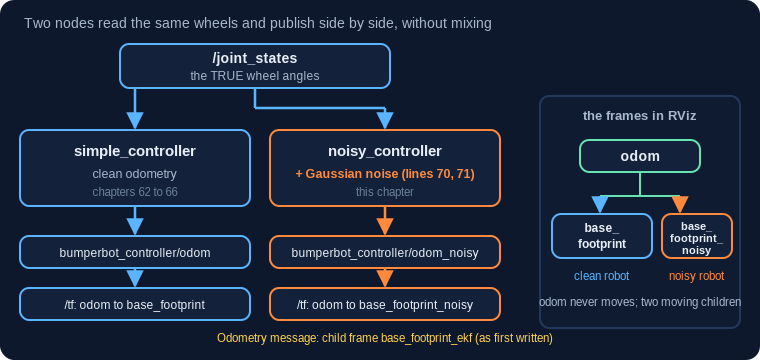
A trap in the names. The Odometry message says its child frame is base_footprint_ekf (line 42), but the transform says base_footprint_noisy (line 51). The simple controller uses the same name in both. As far as I know the name with ekf is meant for a later step (an extended Kalman filter), so it is left as first written. If one program will use both the message and the transform, give them the same child name.
Code visualizer
Every line explained, with a step-by-step run of one reading with noise, a map, bugs to try (including the ones that print no error) and a live picture of the clean and the noisy path. The notes of the lines that did not change come from chapter 66.
Install and build
CMakeLists.txt
The package must install the new file as a program, or ros2 run will not find it. Open CMakeLists.txt of bumperbot_controller. Where simple_controller.py is installed, copy that line and paste it right below, then change the name:
install(PROGRAMS
  ${PROJECT_NAME}/simple_controller.py
  ${PROJECT_NAME}/noisy_controller.py
  DESTINATION lib/${PROJECT_NAME}
)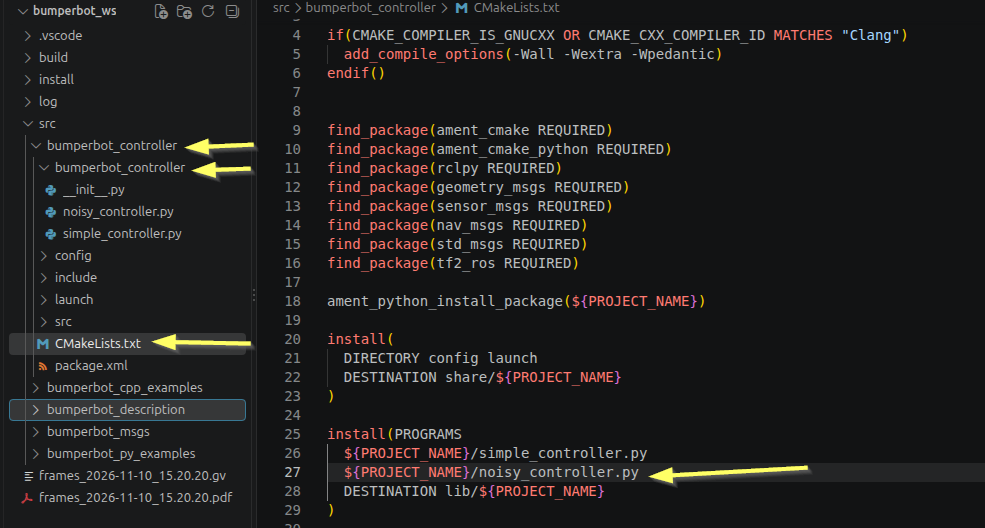
No other change is needed: the packages the node uses (nav_msgs, tf2_ros, geometry_msgs, sensor_msgs) are already in the file from the earlier chapters, as the screenshot shows.
Build the workspace
Open a terminal and build, to see that everything installs:
cd bumperbot_wscolcon buildWhat you should see
Starting >>> bumperbot_msgs
Starting >>> bumperbot_controller
Starting >>> bumperbot_cpp_examples
Starting >>> bumperbot_description
Finished <<< bumperbot_description [0.26s]
Finished <<< bumperbot_cpp_examples [0.37s]
Finished <<< bumperbot_msgs [0.88s]
Starting >>> bumperbot_py_examples
Finished <<< bumperbot_controller [2.77s]
Finished <<< bumperbot_py_examples [2.41s]

Summary: 5 packages finished [3.50s]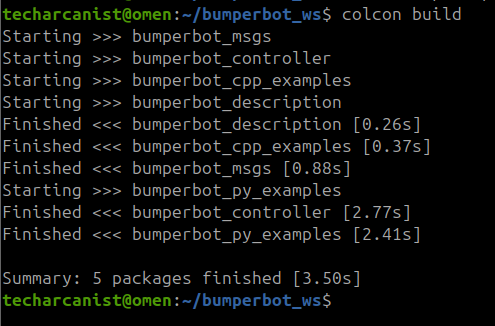
The build works, so the node is installed. It is not started yet. In the next chapter the noisy controller runs together with the simple controller, and the poses of the two are compared.
Remember
- The noisy controller is a copy of the odometry of the simple controller, with a random error added to each wheel angle. The Gazebo angles are perfect; a real encoder is not.
- It listens only to
joint_states: no speed command, no wheel publisher, novelCallback. Driving stays the job of the simple controller. np.random.normal(0, 0.005)draws from a Gaussian: mean first (0, no lean) and standard deviation second (0.005 rad, 0.29 degrees). About 68 of 100 draws fall within one standard deviation.- Each wheel gets its own draw at every reading (lines 70 and 71). dp is made from the noisy angles (lines 73 and 74); the stored angles on lines 76 and 77 stay the true ones, so each dp holds one fresh error and the errors add up.
- Errors add up like a random walk: the spread of the heading grows like √N. With σ = 0.005 it is 0.0013726 rad per reading and 0.04341 rad (2.49 degrees) after 1000 readings.
- To run next to the simple controller, use another node name (
noisy_controller), another topic (bumperbot_controller/odom_noisy) and another child frame (base_footprint_noisy) with the same parentodom. - The Odometry message of this node names its child
base_footprint_ekfand the transform names itbase_footprint_noisy: two names, one robot. - Install the file with one more line in
install(PROGRAMS ...)ofCMakeLists.txt, thencolcon build. The node is started in the next chapter.