


Visualize the Robot With Launch Files
Open VS Code

Make one launch folder inside bumperbot_description.
Launch file

Create display.launch.py file inside launch folder
LLLLLLLLLLLLL
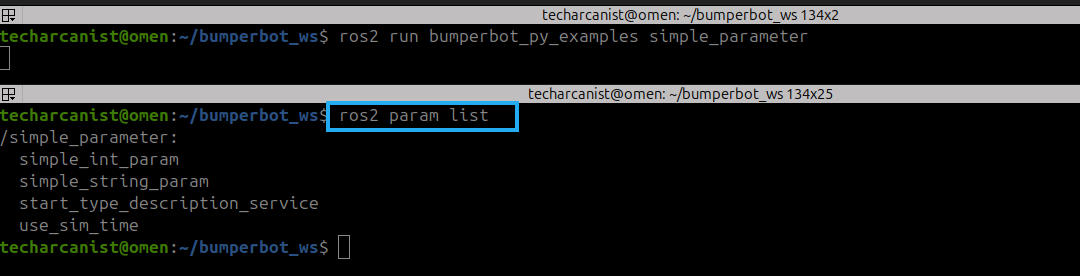
Open a new terminal. ctrl+O
Source the workspace again:
cd bumperbot_ws. install/setup.bash
Now run:
ros2 param list
It shows the parameters available for the currently running ROS 2 nodes.
Read a Parameter’s Value

Now that we know the parameter exists, we can read its current value.
Use:
ros2 param get /simple_parameter simple_int_param
You should see that the current value is 23
Understanding ros2 param get
Let’s break the command down:
ros2 param get /simple_parameter simple_int_param
ros2 param get │ ├── /simple_parameter │ ↓ │ Node │ └── simple_int_param ↓ Parameter
So the command means:
Get the value of
simple_int_paramfrom the/simple_parameternode.
The general syntax is:
ros2 param get <node_name> <parameter_name>
Start the Node With a Different Parameter Value

Press Ctrl+c to stop the running simple_parameter node.

Now start it again, but this time set simple_int_param to 30:
ros2 run bumperbot_py_examples simple_parameter --ros-args -p simple_int_param:=30Understanding --ros-args and -p
The command contains two important parts:
--ros-args
and:
-p simple_int_param:=30
--ros-args
This tells ROS 2 that additional ROS-specific arguments are being provided.
-p
The -p option is used to provide a parameter value.
So:
-p simple_int_param:=30
means:
Set
simple_int_paramto30when starting the node.
The complete command therefore means:
Start simple_parameter │ ▼Use ROS arguments │ ▼Set simple_int_param │ ▼30
Check the New Value

The node is now running again, but this time:
simple_int_param = 30
We can verify it from another terminal.
Run:
ros2 param get /simple_parameter simple_int_param
Read the String Parameter

We can read it using:
ros2 param get /simple_parameter simple_string_param
The command follows the same structure:
ros2 param get <node> <parameter>
Change a Parameter While the Node Is Running
One of the most useful features of ROS 2 parameters is that we do not necessarily need to restart the node to change a parameter.
We can change a parameter while the node is already running.
For example, let’s change:
simple_string_param
from:
lavitra
to:
tech_arcanist
Use:

ros2 param set /simple_parameter simple_string_param "tech_arcanist"
The general syntax is:
ros2 param set <node_name> <parameter_name> <new_value>
Therefore, the running node prints a message similar to:
[INFO] [simple_parameter]:Param simple_string_param changed!New value is tech_arcanist