
62Chapter 62 of 74
Simple Controller: Robot Speed from Joint States
Introduction
In the earlier chapters the node simple_controller only worked in one direction: it took a speed command for the robot on bumperbot_controller/cmd_vel and turned it into a speed for each wheel with the inverse of the conversion matrix.
This chapter adds the other direction. The node now reads the wheel angles on the joint_states topic and works out how fast the robot is really driving and turning:
- how far each wheel turned since the last message (new angle minus old angle),
- how much time passed (stamp now minus stamp before),
- the speed of each wheel (angle ÷ time),
- and from those, the driving speed and the turning speed of the robot.
This is the first step of odometry: knowing how the robot moves from how its wheels move. To test it, the robot is told to turn on the spot at 0.5 rad/s, and the node should measure about the same 0.5.
The simple controller from the earlier chapters must already build and run, with the Gazebo simulation and the controller launch file. This chapter changes simple_controller.py and adds one dependency.
The formulas
Every letter first, then the formula:
| Letter | Meaning | Value here |
| r | wheel radius | 0.033 m |
| s | wheel separation (distance between the two wheels) | 0.17 m |
| Δφ (dp in the code) | how far a wheel turned since the last reading: new angle minus old angle | in rad |
| Δt (dt in the code) | time between the two readings: stamp now minus stamp before | in s |
| φ̇R, φ̇L (fi_right, fi_left) | speed of the right and left wheel: Δφ ÷ Δt | in rad/s |
| V (linear) | driving speed of the robot: (r × φ̇R + r × φ̇L) ÷ 2 | in m/s |
| ω (angular) | turning speed of the robot: (r × φ̇R minus r × φ̇L) ÷ s | in rad/s |
These are the two rows of the same conversion matrix the controller already uses. velCallback uses its inverse to go from the robot speed to the wheel speeds (a command). jointCallback uses the rows as they are to go from the wheel speeds to the robot speed (a measurement).
Writing the code
Open the file
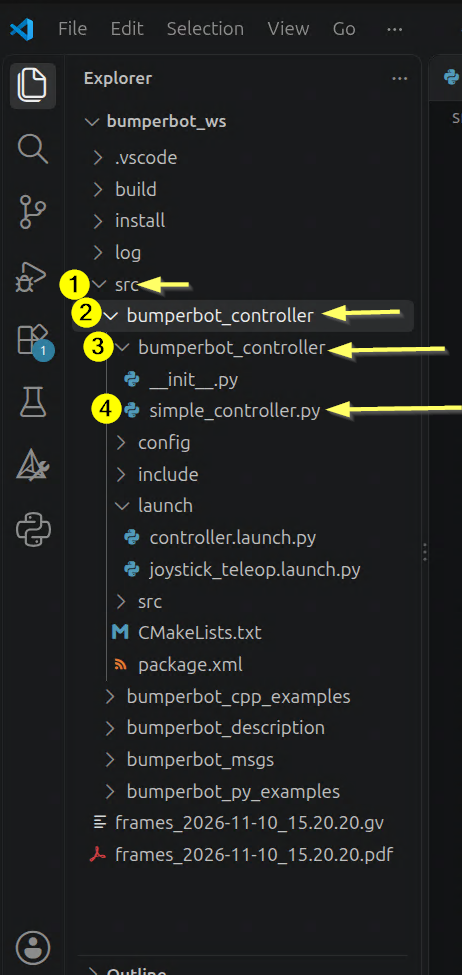
In VS Code, open src, then the bumperbot_controller package folder, then the bumperbot_controller folder inside it, and open simple_controller.py.
The code
The whole node, with the new odometry part added to the controller from before:
#!/usr/bin/env python3

import rclpy
from rclpy.node import Node
from std_msgs.msg import Float64MultiArray
from geometry_msgs.msg import TwistStamped
from sensor_msgs.msg import JointState
import numpy as np
from rclpy.time import Time
from rclpy.constants import S_TO_NS


class SimpleController(Node):

    def __init__(self):
        super().__init__("simple_controller")

        self.declare_parameter("wheel_radius", 0.033)
        self.declare_parameter("wheel_separation", 0.17)

        self.wheel_radius_ = self.get_parameter("wheel_radius").get_parameter_value().double_value
        self.wheel_separation_ = self.get_parameter("wheel_separation").get_parameter_value().double_value

        self.get_logger().info("Using wheel radius %f" % self.wheel_radius_)
        self.get_logger().info("Using wheel separation %f" % self.wheel_separation_)

        self.left_wheel_prev_pos_ = 0.0
        self.right_wheel_prev_pos_ = 0.0
        self.prev_time_ = None   # set from the first joint_states message

        self.wheel_cmd_pub_ = self.create_publisher(Float64MultiArray, "simple_velocity_controller/commands", 10)
        self.vel_sub_ = self.create_subscription(TwistStamped, "bumperbot_controller/cmd_vel", self.velCallback, 10)
        self.joint_sub_ = self.create_subscription(JointState, "joint_states", self.jointCallback, 10)

        self.speed_conversion_ = np.array([[self.wheel_radius_/2, self.wheel_radius_/2],
                                           [self.wheel_radius_/self.wheel_separation_, -self.wheel_radius_/self.wheel_separation_]])
        self.get_logger().info("The conversion matrix is %s" % self.speed_conversion_)

    def velCallback(self, msg):
        robot_speed = np.array([[msg.twist.linear.x],
                                [msg.twist.angular.z]])

        wheel_speed = np.matmul(np.linalg.inv(self.speed_conversion_), robot_speed)

        wheel_speed_msg = Float64MultiArray()
        wheel_speed_msg.data = [wheel_speed[1, 0], wheel_speed[0, 0]]

        self.wheel_cmd_pub_.publish(wheel_speed_msg)

    def jointCallback(self, msg):
        now = Time.from_msg(msg.header.stamp)

        # First message, or sim time went backwards (e.g. sim reset): re-seed
        if self.prev_time_ is None or now < self.prev_time_:
            self.left_wheel_prev_pos_ = msg.position[0]
            self.right_wheel_prev_pos_ = msg.position[1]
            self.prev_time_ = now
            return

        dt = (now - self.prev_time_).nanoseconds / S_TO_NS
        if dt == 0.0:   # duplicate stamp
            self.get_logger().warn("Skipping joint state: duplicate stamp",
                                throttle_duration_sec=2.0)
            return

        dp_left = msg.position[0] - self.left_wheel_prev_pos_
        dp_right = msg.position[1] - self.right_wheel_prev_pos_

        self.left_wheel_prev_pos_ = msg.position[0]
        self.right_wheel_prev_pos_ = msg.position[1]
        self.prev_time_ = now

        fi_left = dp_left / dt
        fi_right = dp_right / dt

        linear = (self.wheel_radius_ * fi_right + self.wheel_radius_ * fi_left) / 2
        angular = (self.wheel_radius_ * fi_right - self.wheel_radius_ * fi_left) / self.wheel_separation_

        self.get_logger().info("linear: %f, angular: %f" % (linear, angular))


def main():
    rclpy.init()

    simple_controller = SimpleController()
    rclpy.spin(simple_controller)

    simple_controller.destroy_node()
    rclpy.shutdown()


if __name__ == '__main__':
    main()
What is new
- Lines 7, 9 and 10: three new imports: the
JointStatemessage, theTimeclass andS_TO_NS, the number of nanoseconds in one second (1 000 000 000). - Lines 24 and 25: the start-up log now uses
%f, so the sizes are printed as 0.033000 and 0.170000 instead of 0. - Lines 27 to 29: the "before" values: both wheel angles start at 0.0 rad and
prev_time_starts asNone: the firstjoint_statesmessage sets it. - Line 33: a subscription to
joint_statesthat callsjointCallbackfor every message. - Lines 50 to 79:
jointCallbackitself: the time stamp of the message (line 51), the first-message check that only stores the first reading (lines 53 to 58), dt in seconds (line 60), a check for a repeated stamp (lines 61 to 64), the change of angle of each wheel (lines 66 and 67), the new "before" values (lines 69 to 71), the wheel speeds (lines 73 and 74) and the robot speed (lines 76 and 77), printed in the log (line 79).
Code visualizer
Every line explained at three levels, with a step-by-step run, a map, bugs to try and a live picture of the odometry.
How jointCallback links to chapters 59 to 61
jointCallback is the theory of the last three chapters turned into code: the encoder angles from chapter 60, Δφ, Δt and the wheel speeds from chapter 61, the matrix that gives V and ω, and the counting of small steps from chapter 59. Step through it to see which lines run and which chapter each idea comes from, with the numbers worked out. The two error switches show how a chapter 60 error slips through unnoticed and makes the position drift.
One matrix, two directions
Pick a command and watch it go out to the wheels and come back as a measurement. The checkbox shows what happens when the node is given the wrong wheel radius.
Adding the sensor_msgs dependency
JointState comes from the sensor_msgs package, so the package has to say that it needs it, in two files in the same bumperbot_controller folder.
CMakeLists.txt
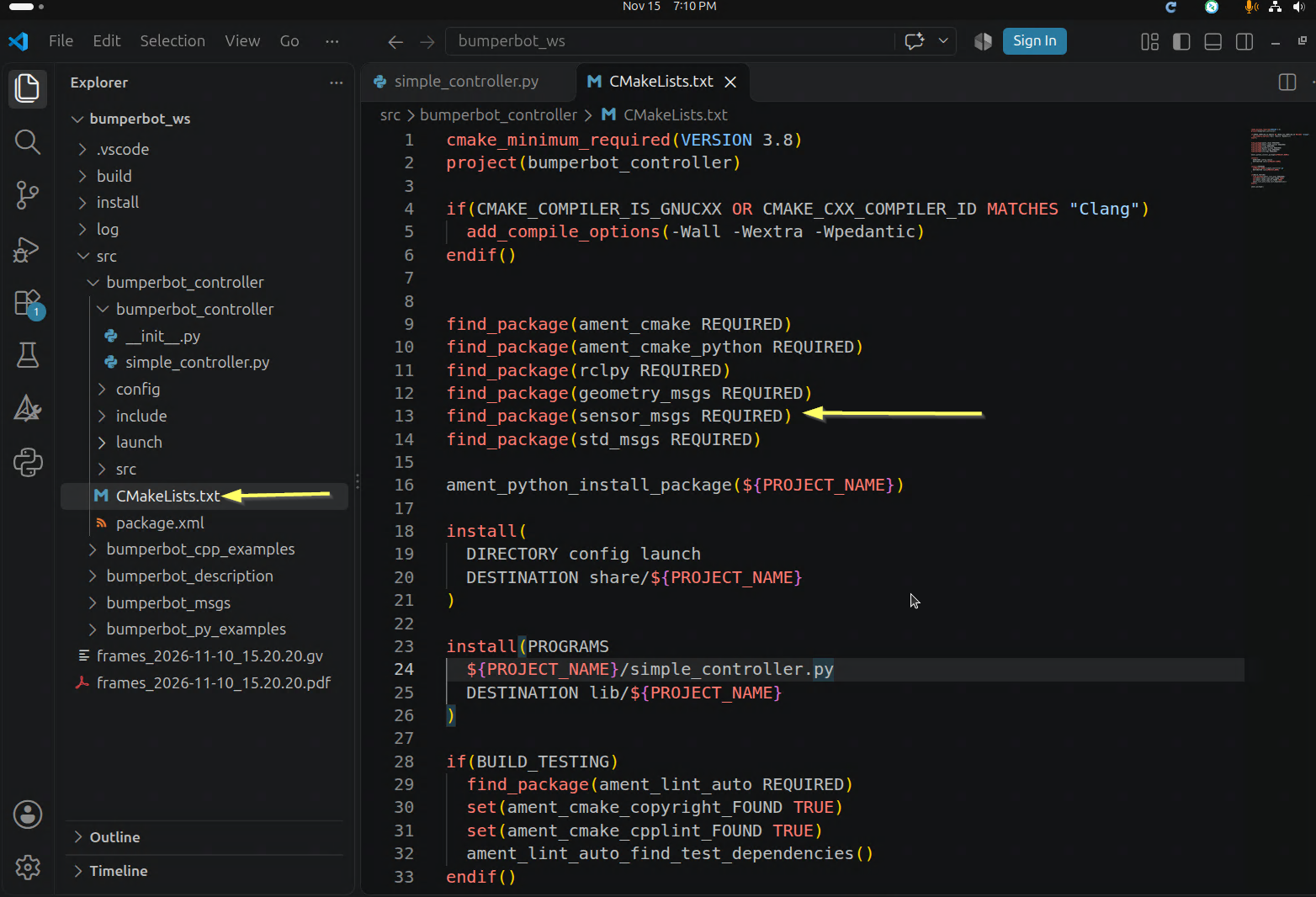
Add:
find_package(sensor_msgs REQUIRED)package.xml
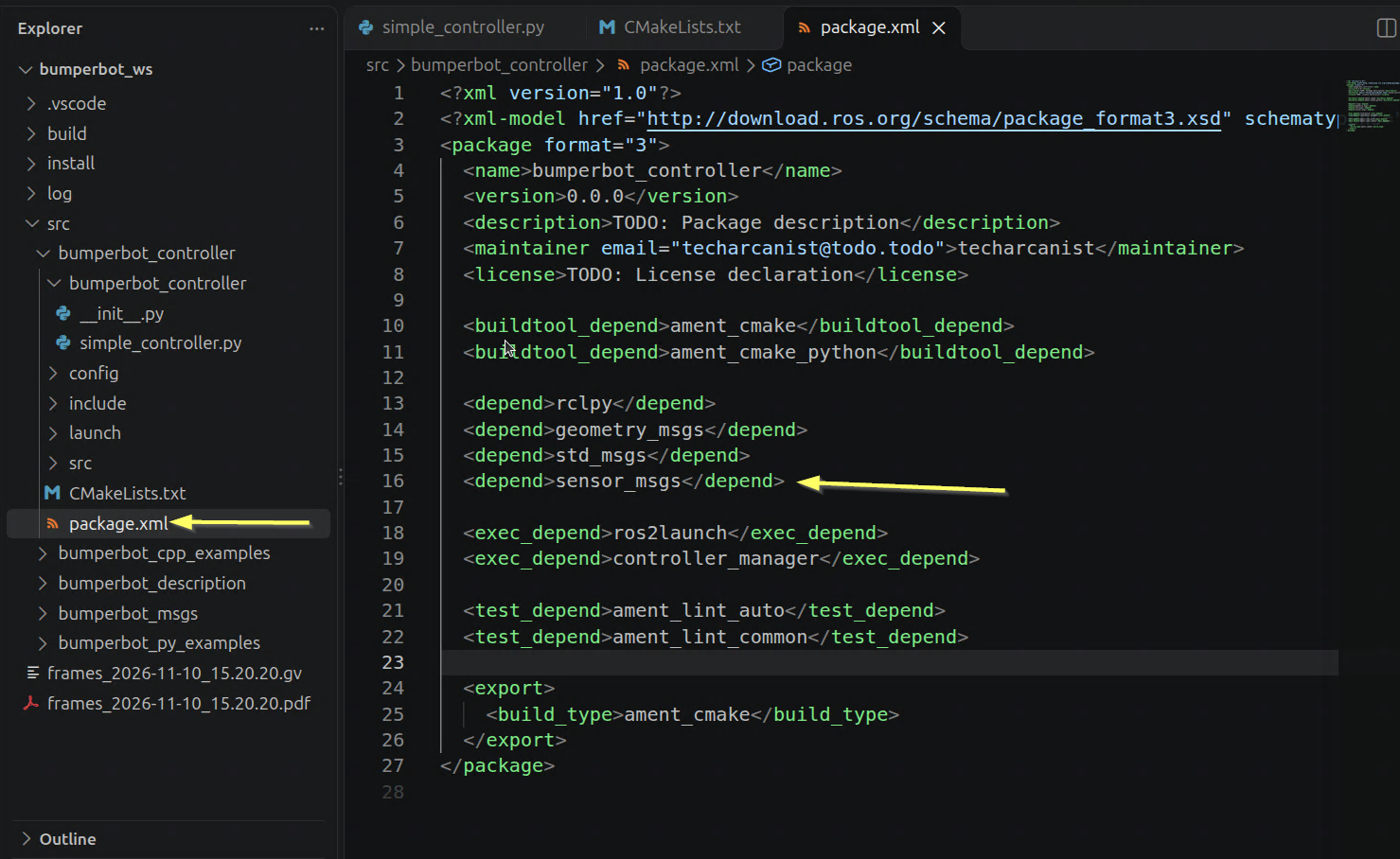
Add, under the other <depend> lines:
<depend>sensor_msgs</depend>Building and running
Terminal 1: build
Open a new terminal and build the workspace:
cd bumperbot_wscolcon buildWhat you should see
Starting >>> bumperbot_msgs
Starting >>> bumperbot_controller
Starting >>> bumperbot_cpp_examples
Starting >>> bumperbot_description
Finished <<< bumperbot_description [0.65s]
Finished <<< bumperbot_msgs [2.48s]
Starting >>> bumperbot_py_examples
Finished <<< bumperbot_controller [8.49s]
Finished <<< bumperbot_py_examples [10.3s]
Finished <<< bumperbot_cpp_examples [29.3s]

Summary: 5 packages finished [29.7s]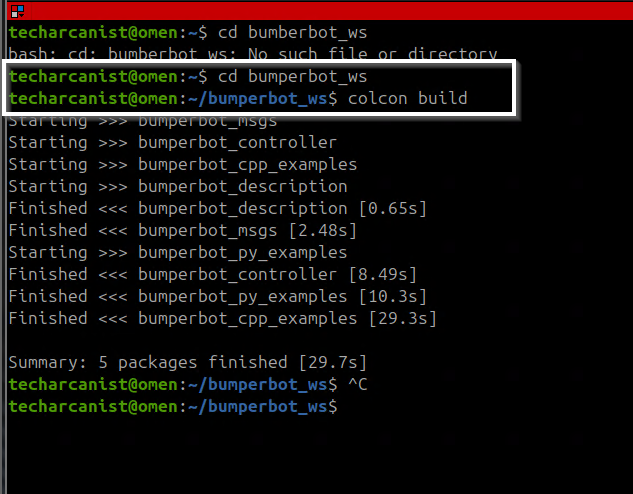
Terminal 2: the simulation
Open another terminal, source the workspace and start Gazebo with the robot:
. install/setup.bashros2 launch bumperbot_description gazebo.launch.py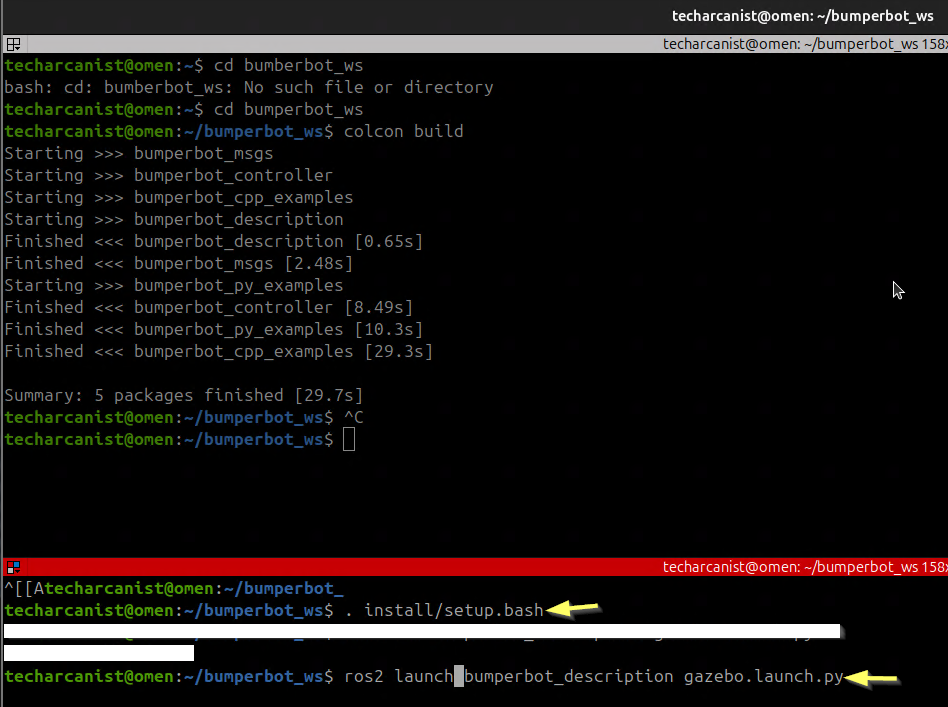
Terminal 3: the controllers and the node
Open one more terminal and start the controllers, which also start simple_controller:
. install/setup.bashros2 launch bumperbot_controller controller.launch.py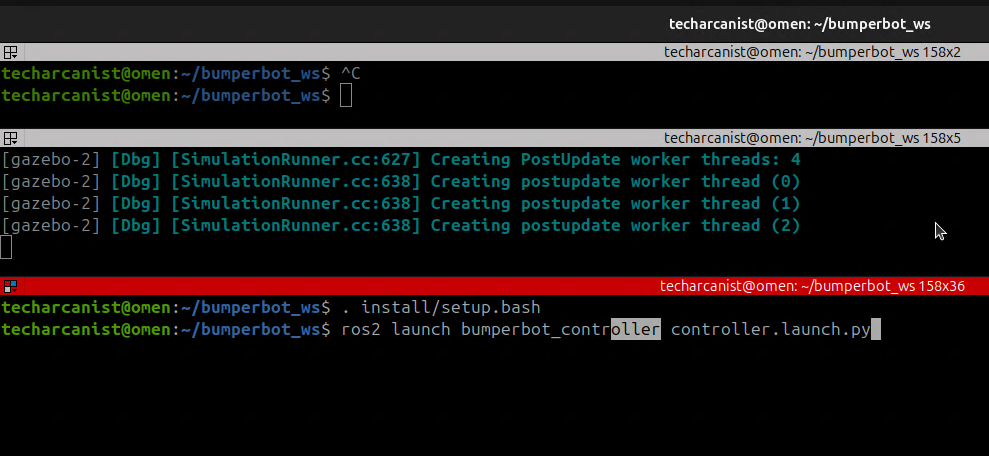
Sending a command and reading the speed
Terminal 4: a turning command
Open a new terminal again, source the workspace and publish a command that only turns: linear speed 0, angular speed 0.5 rad/s.
. install/setup.bashros2 topic pub /bumperbot_controller/cmd_vel geometry_msgs/msg/TwistStamped 'header:
stamp:
sec: 0
nanosec: 0
frame_id: ''
twist:
linear:
x: 0.0
y: 0.0
z: 0.0
angular:
z: 0.5'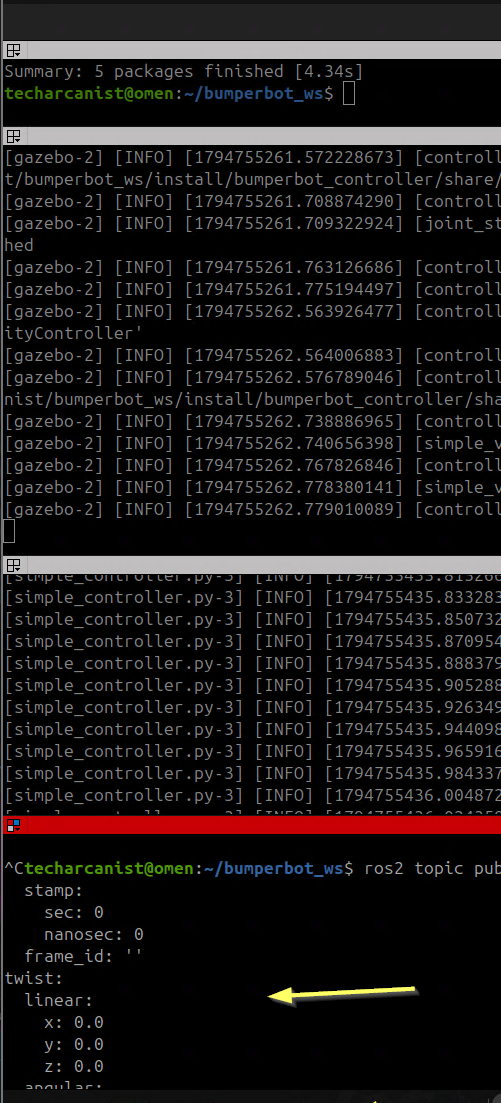
What you should see (the command is sent again and again)
publishing #52: geometry_msgs.msg.TwistStamped(header=std_msgs.msg.Header(stamp=builtin_interfaces.msg.Time(sec=0, nanosec=0), frame_id='None'), twist=geometry_msgs.msg.Twist(linear=geometry_msgs.msg.Vector3(x=0.0, y=0.0, z=0.0), angular=geometry_msgs.msg.Vector3(x=0.0, y=0.0, z=0.5)))

publishing #53: geometry_msgs.msg.TwistStamped(header=std_msgs.msg.Header(stamp=builtin_interfaces.msg.Time(sec=0, nanosec=0), frame_id='None'), twist=geometry_msgs.msg.Twist(linear=geometry_msgs.msg.Vector3(x=0.0, y=0.0, z=0.0), angular=geometry_msgs.msg.Vector3(x=0.0, y=0.0, z=0.5)))

publishing #54: geometry_msgs.msg.TwistStamped(header=std_msgs.msg.Header(stamp=builtin_interfaces.msg.Time(sec=0, nanosec=0), frame_id='None'), twist=geometry_msgs.msg.Twist(linear=geometry_msgs.msg.Vector3(x=0.0, y=0.0, z=0.0), angular=geometry_msgs.msg.Vector3(x=0.0, y=0.0, z=0.5)))

publishing #55: geometry_msgs.msg.TwistStamped(header=std_msgs.msg.Header(stamp=builtin_interfaces.msg.Time(sec=0, nanosec=0), frame_id='None'), twist=geometry_msgs.msg.Twist(linear=geometry_msgs.msg.Vector3(x=0.0, y=0.0, z=0.0), angular=geometry_msgs.msg.Vector3(x=0.0, y=0.0, z=0.5)))

publishing #56: geometry_msgs.msg.TwistStamped(header=std_msgs.msg.Header(stamp=builtin_interfaces.msg.Time(sec=0, nanosec=0), frame_id='None'), twist=geometry_msgs.msg.Twist(linear=geometry_msgs.msg.Vector3(x=0.0, y=0.0, z=0.0), angular=geometry_msgs.msg.Vector3(x=0.0, y=0.0, z=0.5)))

publishing #57: geometry_msgs.msg.TwistStamped(header=std_msgs.msg.Header(stamp=builtin_interfaces.msg.Time(sec=0, nanosec=0), frame_id='None'), twist=geometry_msgs.msg.Twist(linear=geometry_msgs.msg.Vector3(x=0.0, y=0.0, z=0.0), angular=geometry_msgs.msg.Vector3(x=0.0, y=0.0, z=0.5)))

publishing #58: geometry_msgs.msg.TwistStamped(header=std_msgs.msg.Header(stamp=builtin_interfaces.msg.Time(sec=0, nanosec=0), frame_id='None'), twist=geometry_msgs.msg.Twist(linear=geometry_msgs.msg.Vector3(x=0.0, y=0.0, z=0.0), angular=geometry_msgs.msg.Vector3(x=0.0, y=0.0, z=0.5)))
The measured speed
In the controller terminal, jointCallback prints one line for every joint_states message:
What you should see in the controller terminal
[simple_controller.py-3] [INFO] [1794804280.395014753] [simple_controller]: linear: -0.000000, angular: 0.454545
[simple_controller.py-3] [INFO] [1794804280.405066091] [simple_controller]: linear: -0.000000, angular: 0.500000
[simple_controller.py-3] [INFO] [1794804280.417371043] [simple_controller]: linear: -0.000000, angular: 0.833333
[simple_controller.py-3] [INFO] [1794804280.427553601] [simple_controller]: linear: -0.000000, angular: 0.357143
[simple_controller.py-3] [INFO] [1794804280.437835198] [simple_controller]: linear: -0.000000, angular: 0.454545
linear stays at 0, because the wheels turn equally fast in opposite directions. angular stays around the commanded 0.5 but changes from line to line. The formula is right: each reading covers only about 10 ms, and a small difference in that time changes the result a lot. Every value fits the idea that the wheels moved 10 ms of turning per message while the stamps were a whole number of milliseconds apart (my guess from the numbers): for example 11 ms gives 0.5 × 10 ÷ 11 = 0.454545. The widget below replays the 92 values from a longer run of the same test.
Remember
- A speed needs two readings: wheel speed = (new angle minus old angle) ÷ (stamp now minus stamp before), in rad/s.
- The time comes as whole nanoseconds: divide by
S_TO_NS(1 000 000 000) to get seconds. - Driving speed V = (r × φ̇R + r × φ̇L) ÷ 2, turning speed ω = (r × φ̇R minus r × φ̇L) ÷ s: the two rows of the conversion matrix. velCallback uses the inverse (command), jointCallback the rows as they are (measurement).
- Store the reading as the new "before" values only after using the old ones, and skip a message when dt is 0 (a repeated stamp). The first message, or a jump back in time, only stores the "before" values.
- dt is worked out from two message stamps (lines 51 and 60), so the node's own clock is not involved.
- Equal and opposite wheel speeds give linear 0: turning on the spot. The measured angular speed jumps around 0.5 because each reading covers only about 10 ms.
- JointState comes from sensor_msgs: add
find_package(sensor_msgs REQUIRED)to CMakeLists.txt and<depend>sensor_msgs</depend>to package.xml.